Supercharge your automation with AI

AI can take automation beyond fixed rules and predefined steps. Use it where a workflow needs to understand, classify, summarize, generate or make decisions from information that is difficult to handle with traditional automation alone.

Not every workflow needs AI

Many automation tasks are predictable. If a workflow can be handled with a trigger, an action and a condition, adding AI can introduce unnecessary complexity without adding meaningful value.

AI becomes useful when a workflow needs to work with information that is difficult to process with fixed rules, such as understanding natural language, classifying content, extracting information or generating a response.

Use automation when…

  • The rules are clear
  • The inputs are structured
  • The outcome is predictable
  • A condition can determine what happens next

Consider AI when…

  • The information is unstructured
  • Meaning needs to be interpreted
  • Inputs vary significantly
  • A workflow needs to classify, summarize or generate content
The real power comes from combining both

The strongest AI automations don’t replace the workflow around them. They use AI for the parts that require interpretation while the rest of the process stays predictable, visible and controlled.

Let the workflow handle the deterministic parts and give AI the task it is actually good at. ByteChef lets you place AI inside a broader workflow, connect it to the tools and data it needs and define what happens with its output.

Give your workflows capabilities rules can’t provide

Understand

Process natural language, documents and other unstructured information.

Classify

Categorize incoming information and route it based on what the AI detects.

Extract

Turn information buried in text or documents into structured data that the rest of the workflow can use.

Generate

Create responses, summaries, messages or other content as part of an automated process.

See where AI fits into a workflow

The best way to understand AI-powered automation is to see it in context. These pre-built workflows show how AI can handle a specific part of a larger process while the rest of the automation remains structured and predictable.

Classify incoming emails automatically

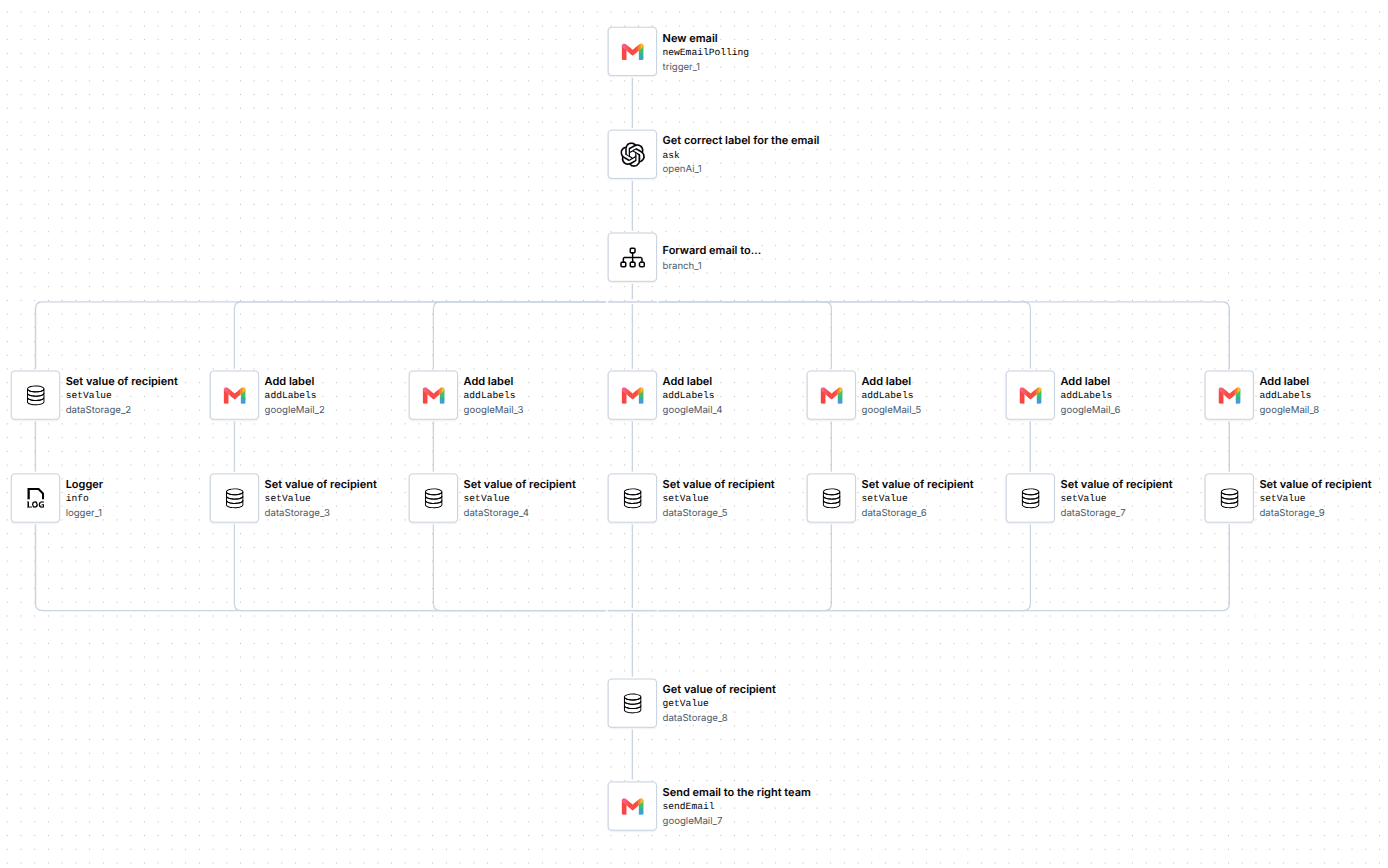
Not every incoming email needs the same response or follow-up. AI can understand the content of each message, classify it according to your defined criteria and pass that result to the workflow so the appropriate next steps happen automatically.

AI Email Classifier workflow: AI interprets and classifies an incoming email while the workflow handles labels, routing and forwarding.

Turn CVs into structured information

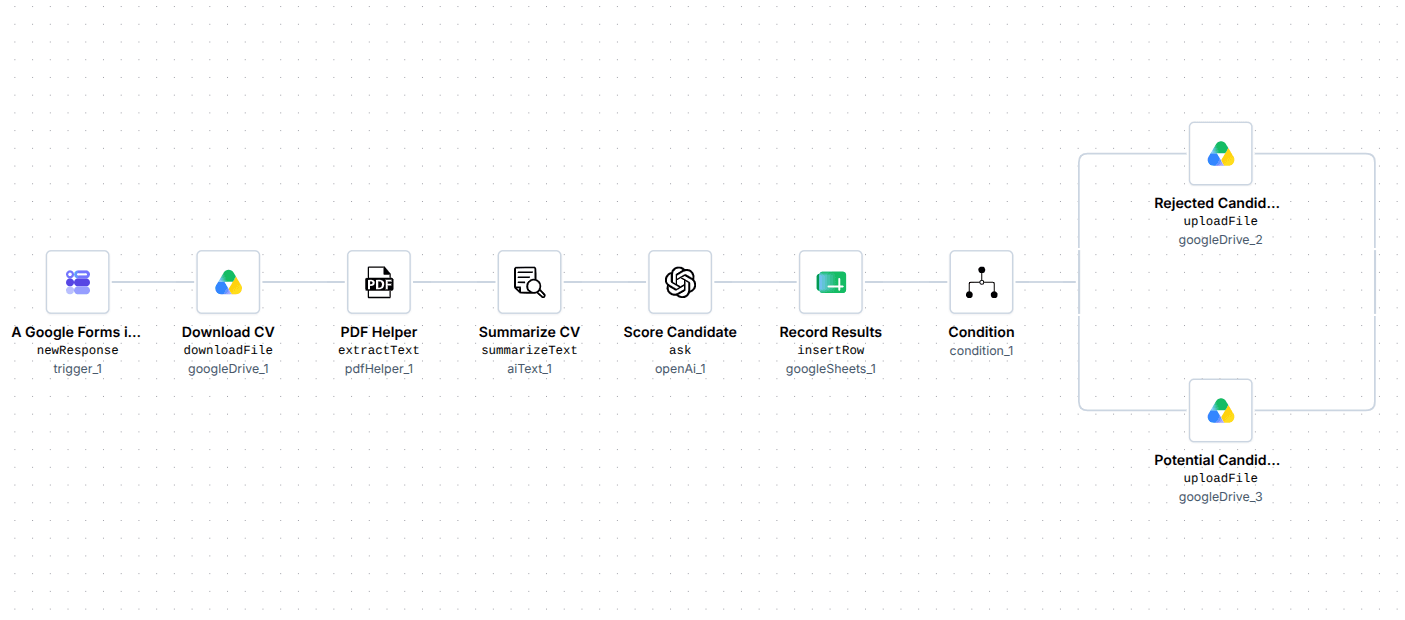
Reviewing CVs manually can mean going through large amounts of unstructured information to find the details that matter. This workflow uses AI to analyze CV content and extract relevant information, turning it into structured data that can be used by the rest of the automation.

CV Scanning workflow: AI extracts and evaluates information from a CV while the workflow records the result and files the document.

Turn incoming emails into scheduled appointments

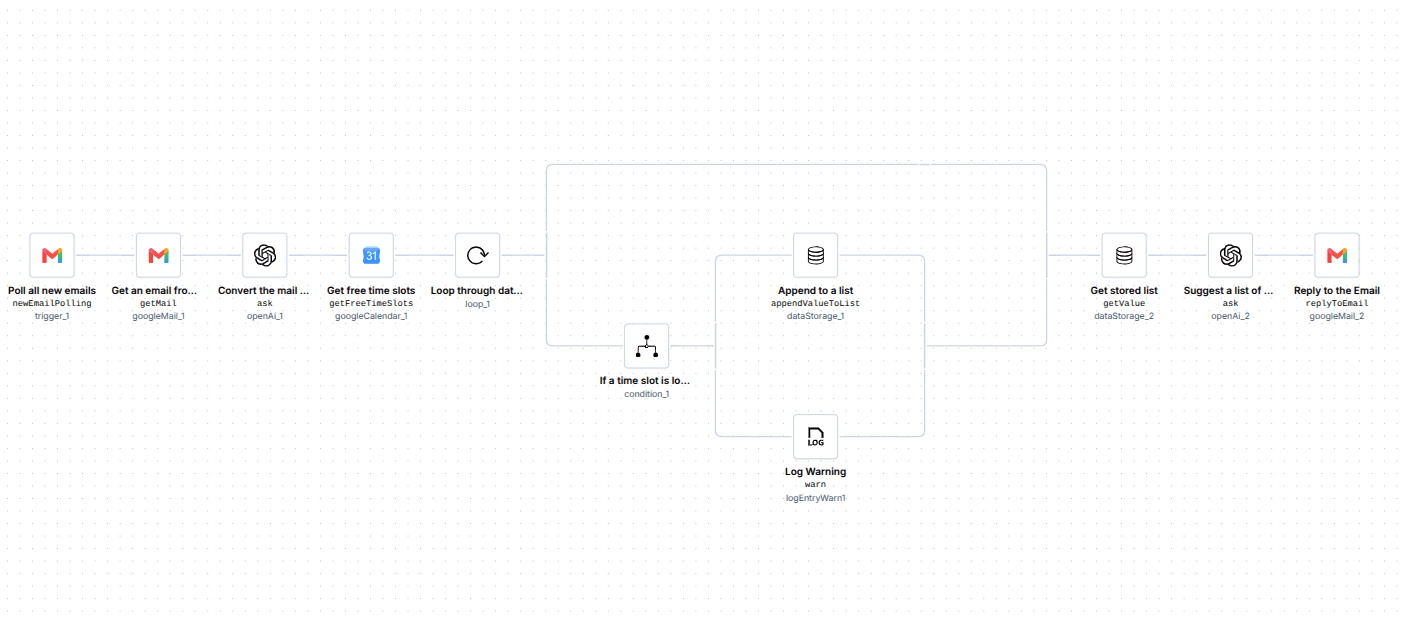
Customer requests often arrive as free-form emails that require someone to understand what the customer needs before taking the next step. This workflow uses AI to interpret the request and help determine suitable appointment options, while the rest of the workflow handles availability and communication automatically.

Scheduling Appointments Based on Incoming Emails workflow: AI extracts a patient's requirements and proposes appointment options while the workflow handles calendar availability and the response.

Powerful doesn’t have to mean uncontrolled

AI works best in automation when its role is clearly defined. Keep the workflow around it visible and configurable, choose the models and providers that fit your needs and add controls where AI output needs to be checked or constrained.

Choose your models

Use the AI providers and models you already trust.

Test before production

Inspect inputs and outputs and test how the AI behaves within the workflow.

Keep control where it matters

Add guardrails or human review when a workflow requires additional control.

Explore Responsible AI

Use AI where it makes your automation better

AI isn’t something every workflow needs. But when a process involves information that rules alone can’t easily understand, AI can add a powerful new capability to the automation around it.

Explore other use cases to see where ByteChef can automate everyday business processes, with or without AI. For deeper examples, explore ourUse Cases blog, where we break down automation scenarios step by step.

Don't miss what comes next

Curious what's coming or waiting for a feature to ship? Subscribe to be the first to know when it launches, plus get release notes, new feature announcements and subscriber-only discounts.

Focus on what matters,automate the rest.