Never miss an important customer request

Automate repetitive customer support tasks, set up alerts for important messages and keep your team informed with workflows built around the tools you already use.

Customer support involves more than answering tickets

Support teams manage a constant flow of customer questions, requests and updates across multiple tools. Important messages need to be noticed, customers need timely updates and repetitive administrative tasks need to be handled alongside the work that actually requires a support agent.

Repetitive tasks take up support time

Support teams often spend time forwarding messages, updating systems, sending notifications and handling other routine tasks that follow predictable patterns.

Important requests can be overlooked

Customer messages can arrive outside working hours or through different channels, making it difficult to ensure that every important request receives timely attention.

Customers expect timely updates

Keeping customers informed often requires manual follow-ups, especially when requests need to be passed between teams or systems.

Support data is spread across tools

Customer conversations, tickets, notifications and internal systems can live in different applications, creating additional work for support teams.

Automate the work around customer support

ByteChef connects the tools your support team already uses and automates the repetitive work between them. From routing and notifications to customer updates and scheduled responses, workflows can handle routine tasks while keeping your team informed when their attention is needed.

Automate repetitive tasks

Build workflows that handle predictable support processes automatically, reducing manual data entry and repetitive actions.

Connect your support tools

Connect ticketing systems, email, messaging platforms and other business tools to move information between them automatically.

Set up intelligent notifications

Trigger notifications when specific customer requests, tickets or events require attention.

Keep customers updated

Automate customer communications based on events, schedules or changes in your support workflow.

Keep customers informed outside working hours

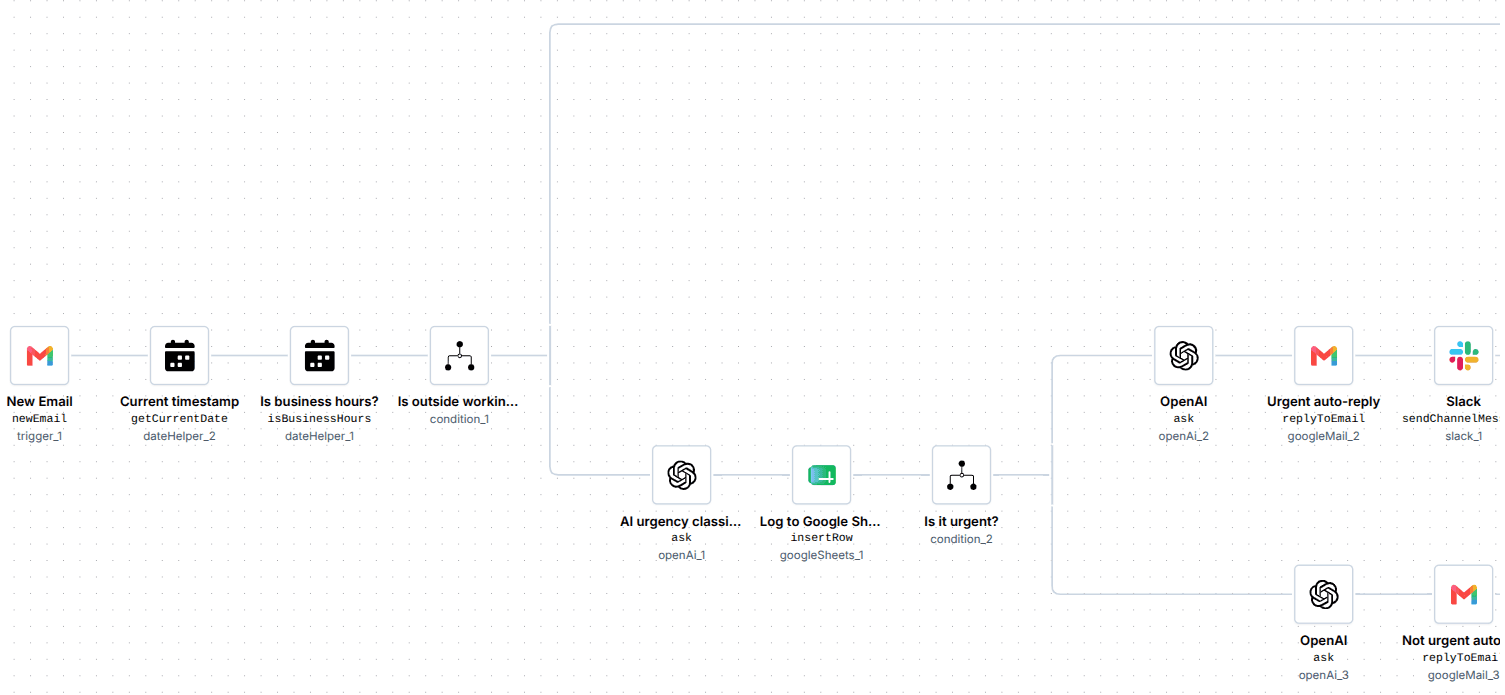
Customer messages don’t stop when your support team finishes for the day. The Out of Working Hours workflow checks incoming Gmail messages, identifies urgent requests and automatically responds or alerts your team based on their urgency.

Out of Working Hours workflow checking a Gmail message, classifying its urgency and routing the response.
Step 01

Check the message

A new Gmail triggers the workflow, which checks whether it arrived during or outside your defined business hours.

Step 02

Identify urgent requests

For emails received outside working hours, OpenAI classifies the email based on its urgency.

Step 03

Log and route the request

The email and its classification are logged in Google Sheets, while urgent requests are prepared for escalation to the internal team.

Step 04

Respond and notify

Urgent emails receive an urgent auto-reply and a Slack alert for the team, while non-urgent messages receive an AI-generated helpful response.

You can start with this pre-built workflow and adapt it to your own support process. Open the template, click Use template and customize the workflow to match the way your team works.

Explore this template

Automate more of your support operations

ByteChef helps support teams automate repetitive work, connect the tools they already use and keep important customer requests moving. Start with a specific process, adapt a pre-built workflow or build your own automation to fit the way your team works.

And customer support is just one place where automation can make an impact. Explore other use cases to discover how ByteChef can help automate processes across different teams, industries and business functions.

For more practical examples, ourUse Cases blogsgo deeper into individual automation scenarios with step-by-step guides and detailed explanations.

Don't miss what comes next

Curious what's coming or waiting for a feature to ship? Subscribe to be the first to know when it launches, plus get release notes, new feature announcements and subscriber-only discounts.

Focus on what matters,automate the rest.