Automate your financial operations

Connect financial data to automated workflows, process it with the tools you need and trigger actions when important changes occur.

Financial processes depend on timely data

Financial teams often work with data from multiple sources and need to monitor changes, compare current values with historical information and act when specific conditions are met. When these checks are performed manually, important changes can take longer to identify and routine analysis can consume valuable time.

Manual data checks

Teams may need to repeatedly retrieve and compare financial data from different sources. Manually collecting and checking these values can turn routine monitoring into repetitive daily work.

Changes can go unnoticed

Without automated monitoring, important changes may only be identified when someone checks the data manually.

Analysis takes time

Even simple calculations and comparisons can require repetitive work before the next action can be taken. Collecting data, processing it and checking the result all add time to routine processes.

Automate the work behind financial decisions

ByteChef can connect to financial data sources, process the information and apply conditions that determine what happens next. This allows routine checks and calculations to become automated workflows that can trigger actions when defined criteria are met.

Connect to data sources

Retrieve financial information from APIs and other connected systems.

Process and transform data

Use workflow steps and scripts to calculate, compare and transform data before it moves through the workflow.

Set conditions

Define the conditions that determine whether a workflow should continue or trigger an action.

Trigger actions automatically

Take the next step when financial data meets the conditions you've defined.

Monitor currency rate changes automatically

Keeping track of currency movements can involve repeatedly checking current rates, comparing them with historical values and deciding when a change requires further action. This workflow automates those checks and lets you define when the next action should be triggered.

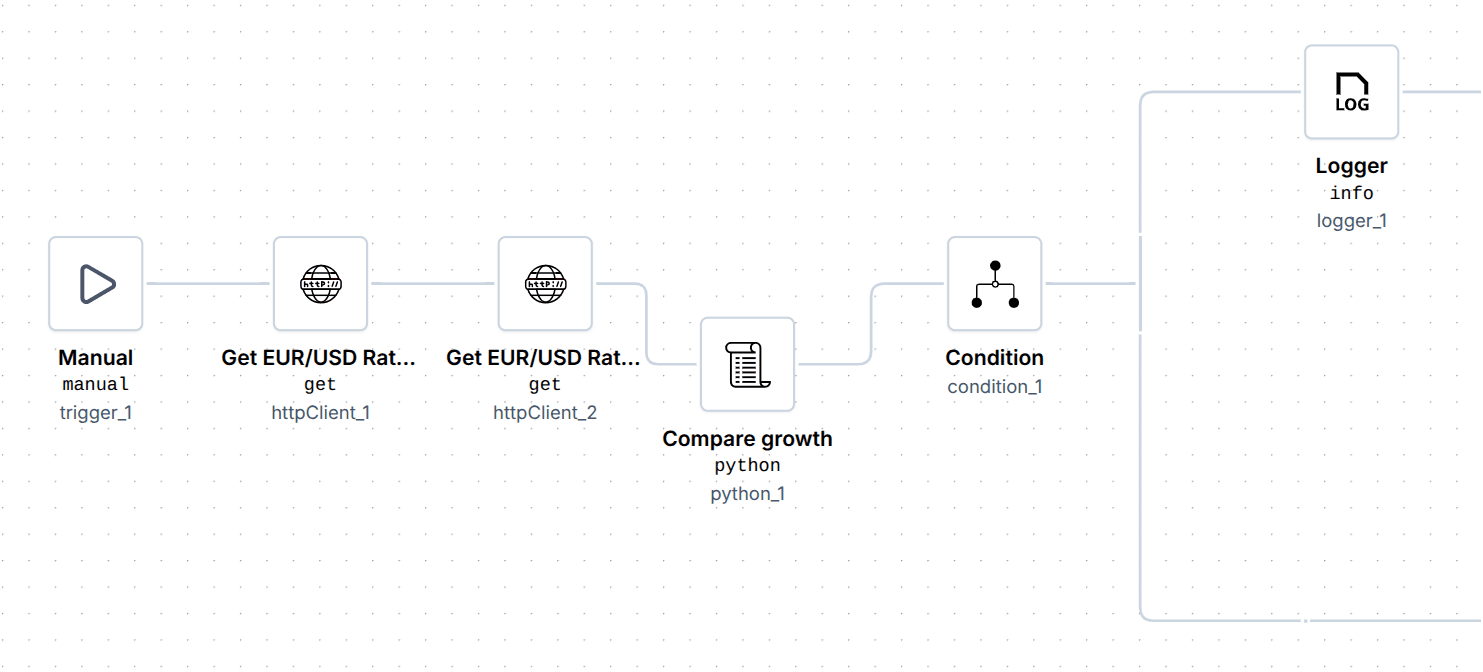
Currency rate monitoring workflow comparing the current and historical EUR/USD exchange rate and triggering an action when the difference exceeds a threshold.
Step 01

Get the current rate

The workflow retrieves the current EUR/USD exchange rate from a REST endpoint.

Step 02

Get the historical rate

The workflow retrieves the historical EUR/USD exchange rate from a REST endpoint for comparison.

Step 03

Process the data

A Python script processes the current and historical values and exposes the results to the workflow.

Step 04

Check the difference

A condition compares the two values. If the difference is larger than the defined threshold, the workflow calls for an action.

You can start with this pre-built workflow and adapt it to your own financial process. Open the template, click Use template and customize the workflow to match the way your team works.

Explore this template

Automation in financial services

Financial automation can go far beyond monitoring data. In one of our customer projects, ByteChef helped InterCapital Securities, a brokerage firm, automate the processing of client payment confirmations by connecting email intake, AI-powered document processing and its proprietary brokerage system.

Read the full case study

Automate more of your financial operations

From monitoring financial data to connecting business systems and automating repetitive processes, ByteChef helps financial teams turn routine work into reliable workflows. Start with a specific process, adapt a pre-built workflow or build an automation around the way your team works.

And Finance is just one area where automation can make an impact. Explore other use cases to discover how ByteChef can help automate processes across different teams, industries and business functions.

For more practical examples, explore ourUse Cases blogs, where we break down individual automation scenarios step by step and in more depth.

Don't miss what comes next

Curious what's coming or waiting for a feature to ship? Subscribe to be the first to know when it launches, plus get release notes, new feature announcements and subscriber-only discounts.

Focus on what matters,automate the rest.