Turn repetitive document work into automated workflows

Automate repetitive document and data processing tasks, from transforming files and updating spreadsheets to moving structured data between systems.

Document processing can become repetitive fast

Businesses work with files and spreadsheets every day, often repeating the same steps to read, transform, update or move data between systems. When these processes are handled manually, routine work takes time and creates more opportunities for inconsistent results.

Manual file processing

Files often need to be opened, filtered, transformed or reformatted before they can be used elsewhere. Repeating these steps manually takes time and makes routine document processing harder to scale.

Spreadsheet work adds up

Updating spreadsheets, managing sheets and preparing recurring reports can involve the same steps over and over again. Automating these tasks can reduce repetitive work and keep processes moving without constant manual input.

Moving data between systems

Data stored in files often needs to be transferred into databases or other business systems before it can be used. Manually moving and checking this data adds extra steps and creates more opportunities for errors.
Turn document processes into workflows

ByteChef connects the tools you use to work with documents and structured data, allowing you to automate the steps between them. Transform files, process spreadsheet data, move information between systems and build workflows that handle repetitive document operations automatically.

Transform and process files

Automate the steps involved in reading, filtering, transforming and generating files without manually processing each one.

Work with spreadsheets

Automate spreadsheet operations such as reading data, updating sheets and generating recurring reports as part of a larger workflow.

Connect documents to your systems

Move structured data from files into databases and other connected systems without manually transferring information between them.

Add logic where you need it

Use conditions, scripts and other workflow steps to process data and determine what happens next based on your requirements.

Transform files automatically

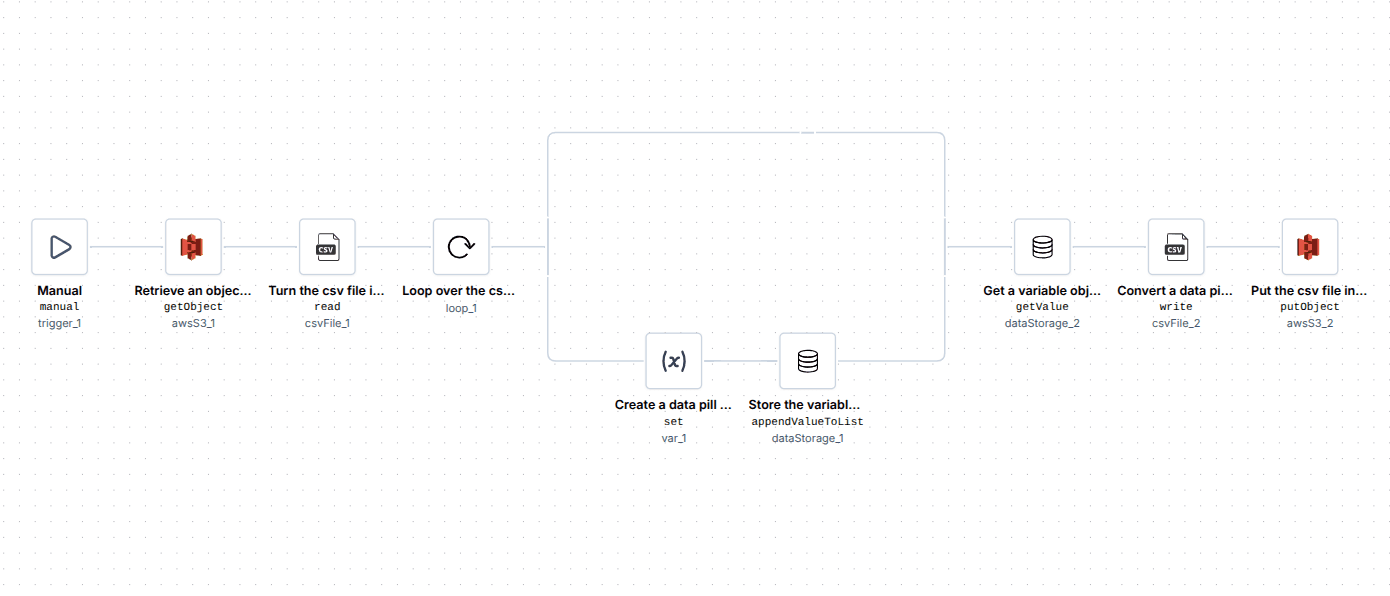
Repetitive file preparation doesn’t have to be a manual process. This workflow retrieves a CSV file from AWS S3, keeps only the required columns, creates a new file and uploads the result back to storage.

Workflow retrieving a CSV file from AWS S3, trimming it down to the required columns and uploading the result back to storage.
Step 01

Retrieve the file

Retrieve offices.csv from AWS S3.

Step 02

Parse the CSV

Parse the file into rows using its header row.

Step 03

Select the data

Loop through the rows and build a new list containing only the four selected columns.

Step 04

Create and upload the result

Convert the reduced list into a new CSV file and upload it to AWS S3 as offices_reduced.csv.

Start with this pre-built workflow and adapt it to your own file-processing process. Click Use template to open it in ByteChef and make it your own.

Explore this template

Move file data into your systems

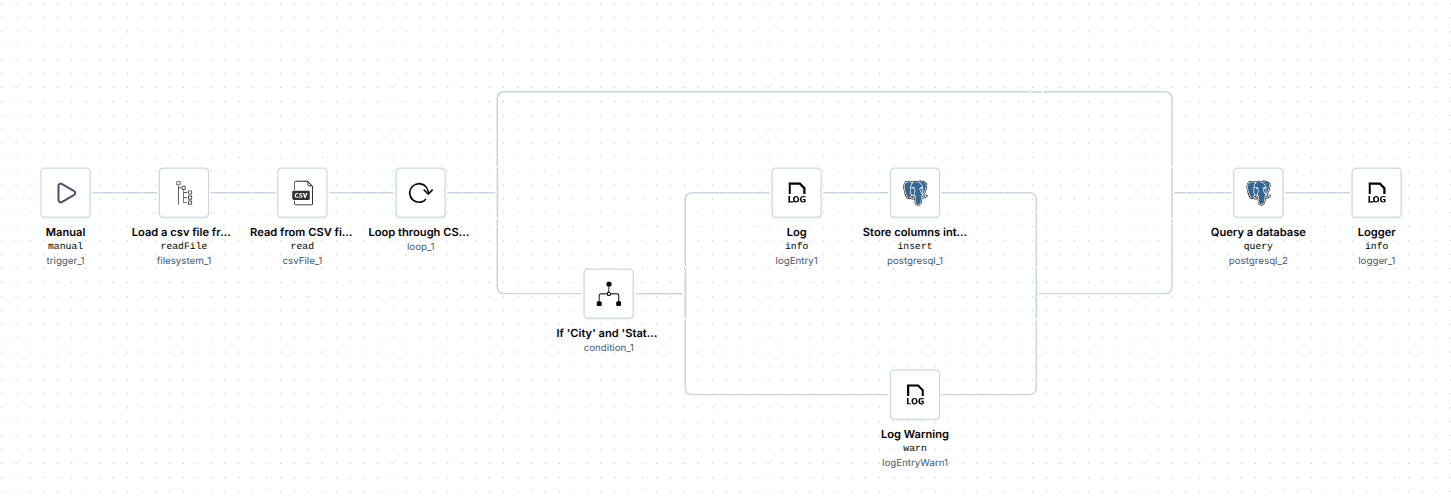
Files are often the starting point for business data. This workflow reads a CSV file, checks each row for the required information and inserts valid records into PostgreSQL while logging incomplete entries for review.

Workflow reading a CSV file, validating each row's City and State values, inserting valid records into PostgreSQL and logging incomplete rows.
Step 01

Load the file

Load cities.csv from the local machine and parse it into rows.

Step 02

Validate each row

Check each row to determine whether both City and State values are present.

Step 03

Insert valid records

Log and insert rows with both required values into the PostgreSQL CITY table, while logging a warning for incomplete rows.

Step 04

Check the result

Query the total record count of the CITY table and log the result.

Need to move data from files into your systems? Start with this workflow and customize the steps to fit your own data validation and database processes.

Explore this template

There’s more to automate

Document operations are just one area where automation can reduce repetitive work and connect business processes. Explore other use cases to discover how ByteChef can help teams automate everyday workflows across different business functions and industries.

Looking for more detailed examples? Explore ourUse Cases blogfor practical automation scenarios explained step by step and in depth.

Don't miss what comes next

Curious what's coming or waiting for a feature to ship? Subscribe to be the first to know when it launches, plus get release notes, new feature announcements and subscriber-only discounts.

Focus on what matters,automate the rest.