Deploy on your terms
Run ByteChef in the cloud, in your private infrastructure or fully on-premise. Keep your workflows, integrations and business data where your organization requires them.
Self-hosted
Run ByteChef in your own infrastructure with full control over your data and environment.
Protected data
Keep credentials encrypted and sensitive values out of logs and execution history.
Scale without changing your deployment model
Run the same ByteChef binary as a single node, or scale out by running more replicas of it behind a shared message broker. The coordinator and the workers live inside every instance, so adding capacity is adding instances. Both shapes are the open-source edition, and moving between them is configuration rather than a rewrite.
ENTERPRISE EDITIONEnterprise splits those roles apart, into independently deployable and independently scalable services, so task execution scales separately from the API and the coordination layer. Deploy on Kubernetes, AWS, GCP, Azure or a hybrid mix of your own infrastructure and ours, with no outbound dependency on a vendor control plane and no runtime license callbacks.
For bursty or isolated workloads, Enterprise also runs a workflow with no database at all: an ephemeral runner executes the job and is thrown away afterwards.
Keep your secrets in your own vault
Store credential material in HashiCorp Vault or AWS Secrets Manager instead of in ByteChef's database. Workflows resolve secrets at execution time and nothing changes in the workflow itself.
Built for multiple organizations
ENTERPRISE EDITIONRun automation for multiple teams, customers or business units from a single ByteChef deployment. Each tenant stays isolated while administrators keep centralized control.
Data isolation
Keep workflows, credentials and resources isolated between tenants.
Independent execution
Manage schedules independently so one tenant cannot affect another.
Per-tenant controls
Apply limits, feature flags and provider routing per tenant.
Isolation that goes beyond permissions
Each tenant can have its own database, scheduler and configuration. Back up, restore or scale one tenant without affecting another.
Feature flags, resource limits and provider routing can also be configured per tenant, allowing different customers to use different settings from the same deployment.
Secure embedded access
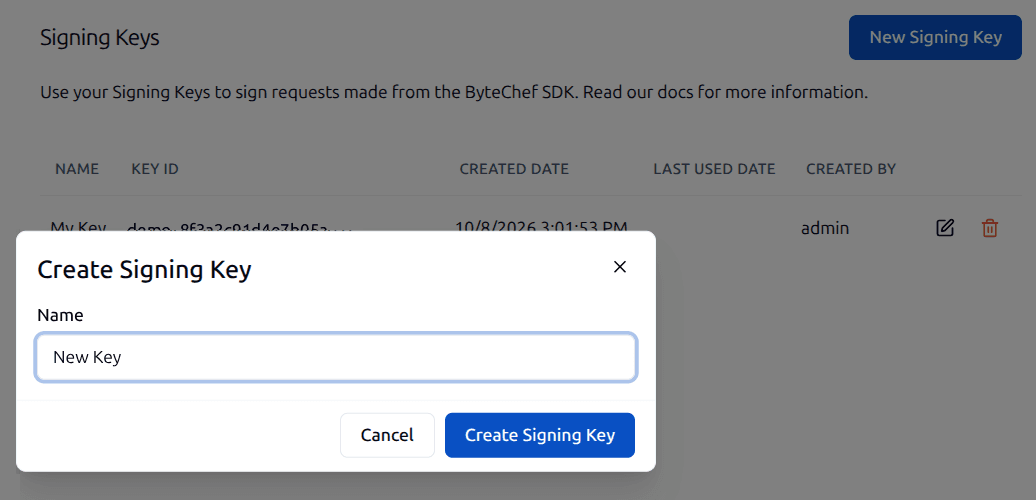
Embed ByteChef into your product and authenticate users with short-lived signed JWTs. Signing Keys let your backend prove a user's identity while ByteChef scopes the session to the correct tenant and user.
Control access at every level
Give teams the access they need without giving them access to everything. Control who can build, deploy and manage automation while keeping sensitive operations protected.
Put people in control where it matters
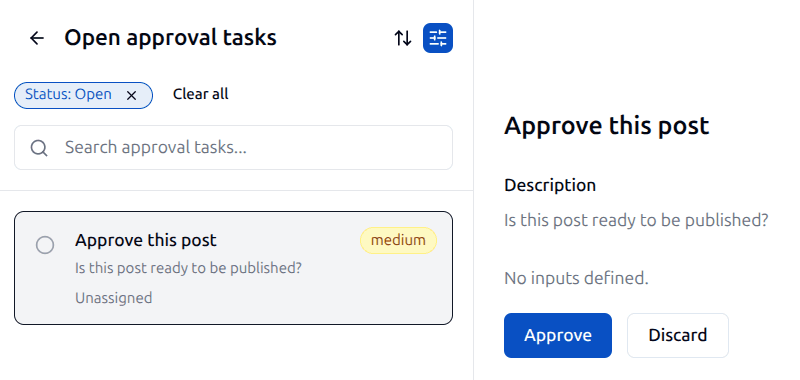
Add approval steps to sensitive workflows and require human review before important actions or production changes continue.
API keys can be issued and revoked per environment, limiting the impact of compromised credentials.
Human approvals
Require a person to approve sensitive changes before they continue.
See human in the loopEnvironment-scoped API keys
Create and revoke API keys independently for each environment.
Enterprise access controls
Role-Based Access Control
Assign workspace roles that control who can view, edit, deploy and execute workflows.
SSO, SAML & OIDC
Connect SAML 2.0 or OIDC for authentication and provision users through SCIM from your identity provider.
Connection visibility
Keep a connection private, share it with one workspace, or make it available across the organization.
Component policies
Control which components are available to workflow builders across your organization.
Audit Logs
Keep a clear record of important changes across your automation platform. Audit logs help teams understand who changed what, when it happened and where the change occurred.
Review administrative activity across your workspace to support operational oversight, troubleshooting and compliance workflows.
Track changes across your workspace
Every entry captures the actor, the action, the target and a before/after diff, so you can see exactly what changed without reconstructing it from other logs.
Audit logs capture who performed an action, when it happened, what changed and where it occurred, making it easy to investigate operational issues or review deployment history.
Bulk operations, like a role change that touches fifty users, share a single correlation ID, so the timeline reads as one event instead of fifty disconnected ones.
Combined with environment separation below and the execution history of every run, audit logs give organizations the operational transparency they need as automation becomes business critical.
Environment Separation
ENTERPRISE EDITIONBuild and test workflows safely before deploying them into production. Separate development, staging and production environments help teams iterate faster while reducing the risk of unexpected changes.
Developers can experiment freely in development while teams validate changes before they reach production. Environment separation gives organizations a safer way to manage workflow changes as automation becomes business-critical.
Development
Build and experiment
Staging
Validate changes
Production
Run business-critical workflows
Promote a project to the next environment
Move a project from development to staging to production in one step. The promotion maps its connections to the target environment as it goes, so nothing has to be reconfigured by hand.
Review a workflow the way you review code
A visual workflow has a canonical file form: one JSON document holding its tasks and their parameters, its trigger configuration, its connection references and its input and output schemas. Connecting a workspace to a Git repository turns that file into the thing your team reviews.
A change to a production workflow stops being something that happened in a canvas and becomes a diff on a branch, with the same history, the same review and the same approval as the rest of your codebase.
Publish pushes, branches pull back
Projects push their workflows to a branch when they publish, and pull back from it afterwards.
No secrets in the repo
Connections are referenced by name, never by secret, so the repository never holds a credential.
Your existing host
Any HTTPS remote: GitHub, GitLab, Bitbucket or self-hosted, configured once per workspace.
Read how it fits with the Git configuration docs.
Don't miss what comes next
Curious what's coming or waiting for a feature to ship? Subscribe to be the first to know when it launches, plus get release notes, new feature announcements and subscriber-only discounts.
By subscribing, you agree to receive emails from ByteChef and to our Privacy Policy. You can unsubscribe at any time.